
When we first published this list in December 2023, most of its ten entries were plugins that suggested the next few lines of code. Checking them again in October 2026, we found one acquired, one archived, one offline, one turned into an AI agency and three folded into other products, while GitHub Copilot and OpenAI Codex had become agents that edit whole repositories and open pull requests. The tools worth choosing between now differ less in how well they write a function than in where they run, what they may do without asking, and how their work reaches review.
What AI coding tools do in 2026
An AI coding tool is a large language model wrapped in software that decides two things: what the model gets to see, and what it is allowed to touch. The model only predicts text. Everything that makes it useful on a real codebase comes from the wrapper.
The wrapper works at three levels, and most products in this list now do all three:
- Completion: as a developer types, the tool sends the code around the cursor to a model and shows the predicted next lines. It is fast and cheap, and the developer accepts or ignores each suggestion.
- Chat and edits: the developer describes a change, the tool gathers context (open files, search results, project rules) and proposes a diff to accept or reject.
- Agents: the model is given tools. It can read and search the repository, edit files, run the build, the tests and other shell commands, call outside systems through the Model Context Protocol (MCP), and open a pull request. It works in a loop: plan, act, check the result, and carry on until the task is done or it needs a decision.
For a manager, the useful comparison is a contractor rather than autocomplete. An agent can do a day of routine work without supervision, and it can make a day of mistakes without supervision. What decides the outcome is the set of controls around it: which commands it may run, which repositories and data it can reach, and who reads the diff before it is merged.
Agents also run in different places. Some run inside the editor on the developer's machine, some in a terminal, and some in the vendor's cloud (or a company's own environment) on a copy of the repository, coming back hours later with a pull request. That last mode is the one that changes team workflows, because work no longer waits for a developer to sit with it.
What happened to the AI coding tools on our 2023 list
We checked every tool from the original list on its own website on 2 October 2026. Three of the ten are still on the list, two of them much changed; the other seven were acquired, archived, folded into other products or taken offline.
| Tool in 2023 | Status on 2 October 2026 | In this list |
|---|---|---|
| OpenAI Codex | The name now belongs to OpenAI's coding agent, included in ChatGPT plans | Yes, as the agent |
| Openkoda | An insurance policy administration system configured with AI | Yes |
| GitHub Copilot | Grown from completion into editor, terminal and cloud agents | Yes |
| Tabnine | Acquired by Tricentis (announced 30 July 2026) for its testing platform; tabnine.com now redirects to Tricentis | No |
| Amazon CodeWhisperer | Became Amazon Q Developer; AWS ends support for the Q Developer IDE plugins on 30 April 2027 and points users to Kiro | Replaced by Kiro |
| Replit Ghostwriter | No longer named on Replit's homepage; Replit's AI product is Replit Agent | Replaced by Replit Agent |
| CodeT5 | Salesforce research models; the GitHub repository was archived on 25 June 2026 | No |
| MutableAI | mutable.ai no longer resolves | No |
| AskCodi | Now describes itself as an AI agency that builds and runs software for its clients | No |
| CodeWP | codewp.ai now redirects to Telex, an AI authoring tool from Automattic | No |
In their place come Cursor, Claude Code, Devin Desktop (called Windsurf until June 2026), JetBrains AI with its Junie agent, Google's Gemini Code Assist and Antigravity, and Kiro from AWS. CodeWhisperer's path is typical: in three years it was renamed once and is now being retired in favour of a different product. Treat a tool choice as a decision you will revisit within two years, which is a reason to keep prompts, project rules and review gates in the repository rather than inside one vendor's product.
The 10 best AI coding tools for software developers in 2026
The first nine tools below write and change code. The tenth, Openkoda, shows a different use of the same technology: AI that replaces the coding work in one business domain. The order is not a ranking.
Prices are as published on each vendor's site on 2 October 2026, in US dollars before tax. Nearly every plan now includes a usage allowance (credits or quotas) and charges for more, so the plan price is a floor, not a forecast of what a team using agents all day will pay.
GitHub Copilot
GitHub Copilot began in 2021 as inline completion in the editor. GitHub now sells it as a coding agent that works in the editor, in the terminal (Copilot CLI), on github.com and in a desktop app, and that can take an issue and come back with a pull request. It runs in VS Code, Visual Studio, JetBrains IDEs, Xcode, Eclipse, Neovim and Zed.
Key features
- Inline completions and next edit suggestions, unlimited on paid plans (2,000 a month on the free plan).
- Agent mode in VS Code, Visual Studio, JetBrains IDEs, Eclipse and Xcode, with MCP servers, custom instructions and custom agents.
- A cloud agent: assign an issue and Copilot researches, plans and writes the change, with or without a pull request. Copilot also reviews pull requests on GitHub.
- Third-party agents (Claude by Anthropic and OpenAI Codex) can be assigned work from the same place, and the model list includes Anthropic, OpenAI, Google and xAI models.
- App modernization for Java and .NET on paid plans.
Key limitations
- Chat, agent mode, code review, the cloud agent and the CLI spend GitHub AI Credits (one credit is $0.01), and the cost of a request depends on the model chosen. Completions do not use credits.
- The cloud agent, pull request reviews and Spaces assume the code lives on GitHub.
- GitHub's own FAQ says suggestion quality depends on how well a language is represented in public repositories.
Pricing
On the Copilot plans page (2 October 2026): Free; Pro $10 a month; Pro+ $39; Max $100; Business $19 per user a month; Enterprise $39 per user a month. Each plan includes a monthly credit allowance. The page also says GitHub is gradually enabling new sign-ups for Business and Enterprise.
Cursor
Cursor, made by Anysphere, is a desktop code editor built around an agent. The same agent runs as a CLI, as cloud agents that work on their own machines, in Slack, and as Bugbot, which reviews pull requests on GitHub.
Key features
- Targeted edits and a full agent with a plan mode in one editor.
- Cloud agents that build, test and demo a feature end to end and come back with the result for review, several in parallel.
- Frontier models from several vendors on paid plans; Composer is available on every plan, including the free one.
- MCP servers, skills and hooks; on Teams, a shared marketplace for internal rules, skills and plugins.
Key limitations
- The full product is its own editor, so a team standardised on JetBrains IDEs or Visual Studio has to switch editors or settle for the CLI.
- Every plan includes a set amount of model usage; beyond it, on-demand usage is billed in arrears.
- Privacy mode has to be switched on (by the user or a team admin) for Cursor to guarantee that code is not used for training.
Pricing
On Cursor's pricing page (2 October 2026): Hobby is free; Individual starts at $20 a month (Pro, with Pro+ and Ultra tiers above it); Teams is $40 per user a month; Enterprise is priced on request.
Claude Code
Claude Code is Anthropic's coding agent. It started in the terminal and now also runs as extensions for VS Code, Cursor, Devin Desktop and JetBrains IDEs, in the Claude desktop app, on the web, on mobile and in Slack. It reads a repository with agentic search, plans, edits files, runs tests and commands, and opens pull requests through GitHub, GitLab and command-line tools.
Key features
- Finds its own context by searching the repository, so the developer does not pick files by hand.
- Runs locally and talks directly to the model API, without a backend server or a remote code index; it asks for permission before changing files or running commands, and since August 2026 an auto mode on Pro, Max and Team plans lets it work longer while still stopping risky commands.
- Long-running and parallel work: several sessions at once, sessions on the web, and self-hosted environments (in public beta) that run sessions inside a company's own network.
- Extends through MCP servers and command-line tools, with project instructions kept in CLAUDE.md files in the repository.
Key limitations
- It runs on Anthropic's Claude models; the product page lists no other vendors' models.
- Subscription plans have usage limits, and with a Claude Console account it consumes API tokens at API prices, so cost grows with use.
- The product page lists no built-in pull request review alongside the agent.
Pricing
On Anthropic's pricing page (2 October 2026), Claude Code is included in Pro at $17 a month billed annually ($20 monthly) and in Max at $100 or $200 a month. A Team standard seat is $20 a month billed annually ($25 monthly); Enterprise is $20 per seat a month plus usage at API rates. It can also be paid per token through a Console account.
OpenAI Codex
The Codex on our 2023 list was an OpenAI model that turned plain English into code. Codex in 2026 is OpenAI's coding agent: one agent, connected by the ChatGPT account, that runs in ChatGPT, as an IDE extension, as the Codex CLI and as cloud tasks.
Key features
- Runs many agents in parallel and uses computer and browser tools to check its work against the requirements.
- Reusable cloud environments for each repository, so tasks continue after the laptop is closed and can be picked up on another device.
- Automatic pull request reviews that report findings and answer questions.
- Plugins that connect other tools and give the agent access to act in them.
Key limitations
- Codex is sold through ChatGPT plans, and usage is capped by plan: OpenAI describes Plus as covering focused coding sessions each week.
- It runs on OpenAI's models; the product page lists no others.
- Cloud tasks run in OpenAI's cloud environments, so teams with strict data rules need to check where repository code goes.
Pricing
Codex is included in ChatGPT Plus, Pro and Business. OpenAI shows plan prices in the visitor's local currency, so see the vendor's pricing page on openai.com/codex (checked 2 October 2026).
Devin Desktop (formerly Windsurf)
Cognition renamed Windsurf to Devin Desktop on 2 June 2026. It keeps the Windsurf editor, extensions and keybindings, backwards-compatible with Windsurf and VS Code, and adds an Agent Command Center added as the default screen: one Kanban board for every local and cloud agent a developer runs.
Key features
- Devin Local, a rewrite of the earlier Cascade agent, runs on the developer's machine; Devin Cloud runs long tasks on its own machine; Devin CLI and Devin Review (code review on every diff) complete the set.
- Spaces group sessions, pull requests, files and context, and share Git worktrees across agents.
- Support for the Agent Client Protocol (ACP), so Codex, Claude Agent, OpenCode and in-house agents run in the same board.
- Tab completion and inline edits, unlimited on every plan.
Key limitations
- The product changed under its users this year: the legacy Cascade agent was kept only until 1 July 2026, so older Windsurf guides describe a different tool.
- Paid plans come with a quota that refreshes daily and weekly; beyond it, extra usage is billed at API prices.
Pricing
On Devin's pricing page (2 October 2026): Free; Pro $20 a month; Max $200 a month; Teams $80 a month for the team plus $40 a month per full seat, up to 200 users; Enterprise on request.
JetBrains AI and Junie
JetBrains AI covers the AI features inside IntelliJ IDEA and the other JetBrains IDEs, the company's own coding agent Junie, the agentic environment Air, and JetBrains Central for governance. Third-party agents (Claude Agent, Codex, Gemini CLI and other ACP agents) run in the same IDEs.
Key features
- Code completion and next edit suggestions from Mellum, a model JetBrains trains for coding.
- Junie in the IDE, in the terminal, in GitHub Actions and in GitLab CI, with a plan mode that writes requirements, design and delivery stages to editable files in the repository before touching code.
- A choice of models from OpenAI, Google, Anthropic and xAI, your own provider keys, or local models through tools such as Ollama.
- Cloud, on-premises or isolated deployment for companies, with central control over which models and agents are used.
Key limitations
- The integration is deepest inside JetBrains IDEs; outside them, Junie runs as a CLI.
- Paid plans come with a monthly allowance of AI credits (10 on AI Pro, 35 on AI Ultimate), so regular agent use needs the higher plan or top-ups.
- The offer spans several products (AI features, Junie, Air, Central), and it takes some reading to see which licence covers what.
Pricing
On the Junie page (2 October 2026): Junie Lite with a free model in every JetBrains account; your own key at provider rates; AI Pro listed at $8.33 and AI Ultimate at $25 per user a month. For company plans, see the vendor's pricing page.
Gemini Code Assist and Google Antigravity
Google sells AI coding in two lines. Gemini Code Assist Standard and Enterprise are the business editions, with extensions for VS Code and JetBrains IDEs and assistance across Google Cloud. For individual developers on the free tier and Google One, Google replaced Gemini CLI and the Code Assist IDE extensions with Antigravity and the Antigravity CLI on 18 June 2026. Antigravity is an agentic development environment: an IDE, a CLI, an SDK and a command center for several local agents.
Key features
- A one-million-token context window; the Enterprise edition can connect private repositories so answers follow a company's own code.
- Gemini Code Assist for GitHub reviews pull requests and suggests fixes.
- Assistance inside Google Cloud services such as Apigee, Application Integration, BigQuery, Cloud Run and Firebase.
- Source citations and IP indemnification for licensed users; Google states that customer code is not used to train shared models.
- Antigravity runs several agents in parallel, drives a browser for front-end work, and offers Claude and open-weight models next to Gemini.
Key limitations
- Two product lines, recently split between individual and business users, so documentation and tutorials often describe the other one.
- Much of the Enterprise value sits in Google Cloud integrations, which matter less to teams on other clouds.
Pricing
On codeassist.google (2 October 2026): Standard $19 per user a month with an annual commitment ($22.80 without); Enterprise $45 ($54 without). Antigravity has a free individual tier with weekly limits; for paid tiers, see the vendor's pricing page on antigravity.google.
Kiro (AWS)
Amazon CodeWhisperer became Amazon Q Developer, and AWS now points Q Developer users in the IDE to Kiro, its agentic IDE and CLI. Kiro's distinctive idea is spec-driven development: a prompt is turned into requirements, a design and a sequence of tasks before any code is written, and the agents then implement the tasks.
Key features
- Specs with requirements, design and tasks, implemented by parallel agents on the developer's machine or in the cloud.
- Requirements checked for contradictions and gaps with automated reasoning, and behaviour checked with property-based tests that assert rules across all inputs.
- A headless CLI for CI/CD that reviews pull requests and fixes bugs without an editor.
- Claude, OpenAI GPT and open-weight models, or Auto, which picks a model per task; ACP, AGENTS.md and MCP support; Open VSX extensions and VS Code settings in the IDE.
Key limitations
- The spec workflow puts documents before code, which suits feature work better than a one-line fix.
- Usage is metered in credits, and premium models cost a multiple of the Auto rate (Claude Opus 5.5 is listed at twice the credits).
- Teams on Amazon Q Developer have to migrate before the IDE plugins lose support on 30 April 2027.
Pricing
On Kiro's pricing page (2 October 2026): Free with 50 credits; Pro $20 per user a month (1,000 credits); Pro+ $40 (2,000); Pro Max $100 (5,000); Power $200 (10,000); extra credits $0.04 each; enterprise plans through sales. Amazon Q Developer Pro is listed at $19 per user a month.
Replit Agent
Ghostwriter, the assistant on our 2023 list, is no longer named on Replit's homepage. Replit Agent builds an app or website from a conversation, inside Replit's browser workspace, with a database, authentication, integrations and hosting included. Replit addresses it to people with no coding experience as well as to developers.
Key features
- Builds from a plain-language description and keeps improving the app from feedback, with a plan mode for larger changes.
- Tests its own work in a browser, writes a report and fixes the issues it finds.
- Built-in database and user authentication, and connections to services such as Stripe and OpenAI.
- Up to 10 parallel agents and database rollback up to 28 days on the Pro plan.
Key limitations
- The agent works in Replit's own workspace and hosting, which suits new apps and prototypes better than changes to an existing system with its own repositories and pipelines.
- Replit's pricing page notes that the agent's behaviour is probabilistic and it may make mistakes.
Pricing
On Replit's pricing page (2 October 2026): Core $20 a month ($18 billed annually); Pro $100 a month ($90 billed annually); Enterprise priced on request.
Openkoda: AI that configures insurance products instead of coding them
Openkoda is not a general-purpose coding assistant, and it will not help with an unrelated application. It is on this list as an example of a different pattern: AI taking over the coding work in one domain. Openkoda is an insurance policy administration system, built by our sister company of the same name, that insurers configure with AI from quote to claim: rating, underwriting, policy administration, claims, billing, workflows, documents and bordereaux reporting for delegated authority.
In most insurance systems, a new coverage or a rate change is a development ticket: someone writes the code, tests it and ships a release. In Openkoda's AI Product Builder, a product manager or underwriter types the change in plain English, for example "add windscreen cover to Motor and re-rate it". The AI does not write code. It drafts a typed change-set from a fixed catalogue of operations, in that example a new coverage, a £500 limit with a £75 excess, a glass-risk rating factor from 1.0 to 1.4 and an underwriting rule that refers a case with more than two prior glass claims. Because every operation comes from the catalogue, the AI cannot produce something the platform will not accept.
A person reviews the before-and-after and approves it. Only then is the change applied, as a new product version: products move from Draft to Current to Superseded, in-force policies stay on the version they were bound under, and a structural change to a product with issued policies automatically creates a new version. Every change goes to the audit trail.
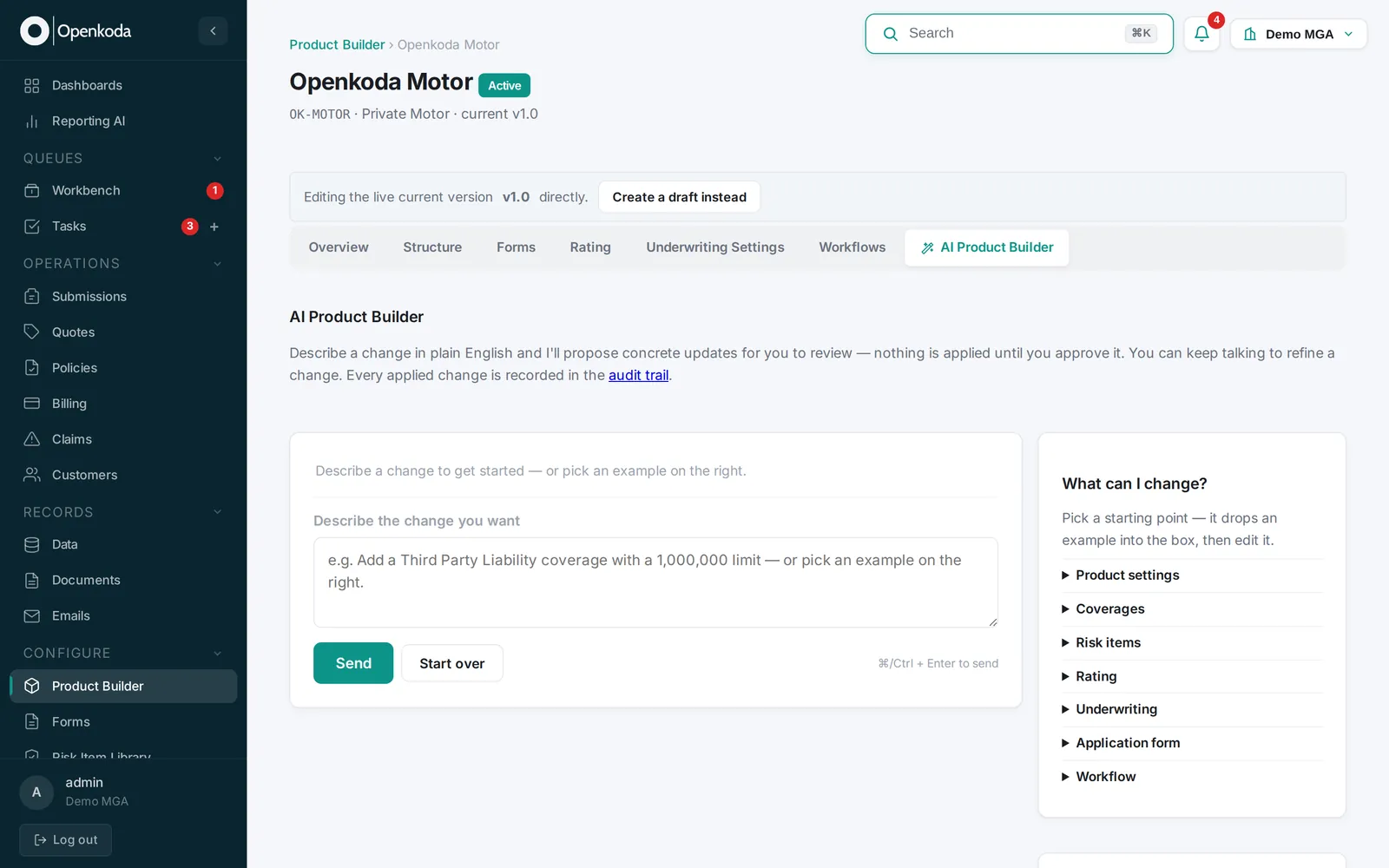
The same approach runs through the rest of Openkoda AI. Reporting AI answers questions about the book in plain English and shows the query it ran; AI document reading pre-fills a case from PDFs, emails and images for a person to confirm; an underwriting copilot surfaces risk signals and pricing context on referred cases; AI steps in workflows summarise, classify or draft correspondence; and an MCP server lets an assistant such as Claude work with the live book under the user's own permissions, with every write previewed, confirmed and audited.
Key features
- AI Product Builder: coverages, limits, rating factors and formulas, underwriting rules, structural and workflow changes, all as typed change-sets that a person approves.
- Versioned products with a full audit trail, so a regulator's question about what the cover was on a given date has an answer.
- Reporting AI, AI document reading, the underwriting copilot, AI workflow steps and an "Explain this" function for reports and metrics.
- An MCP server for Claude Desktop or any MCP client, scoped to the user's permissions, with confirm-gated writes and an option to lock a connection to read-only.
Key limitations
- Insurance only: it serves insurers, MGAs and brokers, not general software development.
- Whatever the catalogue does not cover, such as an integration with a specific carrier feed or finance system, is still built by developers, in Java and Spring.
- Openkoda AI is a separate subscription, and the MCP server is part of the Enterprise plan.
Pricing
Openkoda publishes flat plans on annual contracts, with On-Premise on a custom contract, and Openkoda AI is a separate monthly subscription with a credit allowance; plans and credit rates are on openkoda.com.
We are Openkoda's implementation partner. Core Travel Insurance went from contract to a live policy platform on Openkoda in eight weeks in 2026, and SkyGuard runs its life and aviation policy administration on it (case study).
Do AI coding tools make developers faster? What the research says
Vendor pages quote large productivity gains. The independent evidence is more mixed, and it points to the same conclusion from three directions: speed at the keyboard is not the same as speed to production.
The METR randomized trial and its 2026 update
In early 2025, METR ran a randomized controlled trial with 16 experienced open-source developers working on 246 real issues in their own repositories, each issue randomly assigned to allow or forbid AI tools (mostly Cursor with Claude 3.5 and 3.7 Sonnet). Before the study, the developers forecast that AI would make them 24% faster. Afterwards, they estimated it had made them 20% faster. Measured, tasks took 19% longer when AI was allowed.
METR's February 2026 update, with 57 developers and late-2025 tools, estimated that AI cut task time by 18% for the developers who had taken part in the first study and by 4% for new recruits, with confidence intervals that include no effect. METR calls this only very weak evidence, because many developers now declined to take part: they did not want to work without AI on the control tasks. The lasting finding is the gap between perception and measurement. Developers' own estimates of their speed-up are not a reliable metric, which matters to anyone justifying licences with a survey of the team.
DORA: more output, less stable delivery
Google's DORA research measures delivery at the team level. The 2024 report found that each 25% increase in AI adoption went with an estimated 1.5% drop in delivery throughput and a 7.2% drop in delivery stability. The 2025 report found that 90% of respondents use AI at work and that AI adoption now goes with higher throughput, but still with lower stability. DORA describes AI as an amplifier of what is already there: without strong automated testing, mature version control and fast feedback loops, more change means more instability, and teams held back by tightly coupled systems and slow processes see little or no benefit.
Stack Overflow 2025: wide use, low trust
In the 2025 Stack Overflow Developer Survey, 84% of respondents use or plan to use AI tools and 51% of professional developers use them daily. More distrust the accuracy of AI output (46%) than trust it (33%). The most common frustration, cited by 66%, is "AI solutions that are almost right, but not quite", and 45% say debugging AI-generated code takes longer.
Our CTO put the consequence for developers plainly when this post first ran:
Programmers who have a deep understanding of their craft and are familiar with key programming paradigms need not fear. Those who are code tappers, without any solid programming knowledge, and don't do much beyond any current tasks, well, they'd better start learning.
Arkadiusz Drysch, CTO, Stratoflow
How we use AI coding agents on client systems
We use agents where the research says they pay off: well-defined, repetitive changes that a test suite can check. For Java upgrades we run Claude Code inside our own harness, which looks across the codebase for repeated patterns and edge cases. A repeated pattern, such as the same outdated API in fifty places, becomes one batched change that is reviewed once. An edge case is flagged for an engineer instead of being guessed at.
The gate is the same whichever tool produced the change: an engineer reads every diff, the build passes, the original tests pass with none deleted or skipped, and coverage does not fall. On a wine merchant's fifteen-year-old store and ERP, this took the system from Java 17 and Spring 5.3 to Java 25 and Spring 6.2 in about four weeks, without a feature freeze. Our guide to AI-assisted application modernization describes the method step by step.
Choosing an AI coding tool for your team: a checklist
These are the questions we ask before an agent touches a client's repository. Most of them have nothing to do with which model writes the best code.
- Where does the agent run, and where does the code go? In the editor, in a terminal on the developer's machine, in the vendor's cloud, or in your own environment. Check this against your data and client contracts before the pilot, not after.
- What can it do without asking? Find the permission settings: which commands run automatically, which need confirmation, whether it can push, and whether it can reach production credentials. Start strict.
- Which models does it use, and can you change them? Tools tied to one model vendor move with that vendor's prices and limits.
- How is usage billed? Credits, quotas and per-token charges make the plan price a minimum. Run a two-week pilot on real tasks and read the usage report before you buy seats for everyone.
- Does your review gate hold? DORA's stability finding is the warning: more generated change needs more automated testing, smaller pull requests and reviewers who know the code, not only the language.
- Can you leave? Keep project rules and agent instructions (AGENTS.md, CLAUDE.md and similar files) in the repository, and prefer tools that support open protocols such as MCP and ACP.
- Are you measuring delivery, not feelings? METR showed that developers misjudge their own speed-up. Compare lead time, change failure rate and rework before and after, on the same kind of work.
If you want AI agents working on your Java systems with those controls in place, our AI integration services start with a thirty-minute scoping call and a written ballpark.